Fancy Letters Generator — 400+ Stylish Fonts to Copy and Paste
Instantly transform plain text with our free Fancy Letters Generator. Copy & paste 400+ stylish fonts for social media, gaming bios, and more. No downloads needed.
Transform Plain Text with Fancy Letters
Go beyond basic keyboard letters. Fancy letters use Unicode symbols to create decorative text styles for bios, usernames, captions, and digital designs — no app install required.
Standard text on social media profiles, gaming bios, and digital designs looks flat and fails to grab attention. Even when you try to customize a username or caption, a standard keyboard limits the options to the same basic letters used by everyone else. So that expressing creativity becomes difficult. It can be frustrating, especially when Fancy Letters could help you to showcase a unique style and attraction.
To solve this problem, an online Fancy Letters generator quickly transforms plain words into creative and decorative text styles. It uses unique Unicode characters in order to create text design, thus helping you bypass the limitations of your keyboard letters without downloading any additional software. Apart from Unicode text design, the generator offers instant text conversion, a huge variety of text fonts, and convenient compatibility with various devices.
The detailed guide helps you master our fancy text tools. You can read on to see how quickly you can change your everyday text into fancy cursive letters.
How to Use: Step-by-Step Guide
Generating unique fancy letters takes no technical skills. Type in the box above, pick a style below the tool, and copy your favorite result. Follow these five simple steps to get started.
Find the Text Box
At the top of this page, use the text box that says “Type or paste your text here.” That is where your plain text goes in.
Type Your Message
Click inside that text box and start typing the words or username you want to change. You can also copy text from another app and paste it right here.
Watch the Styles Appear
As you type each letter, the generator works in real time. Look just below the text box and you will see your words turn into hundreds of unique styles right away.
Choose Your Preferred Style
Scroll down through the massive library of options. Look for a style that matches your mood, whether you want elegant cursive, fun bubble letters, or a bold gaming look.
Paste It Anywhere
Go ahead and open the application, game, or any other program where you would like to use the text. Click on the box and then paste the text there. The step completes the entire process, giving you beautiful custom text anywhere you want in seconds.
Pro Tip: The more creative your text, the more amazing the styles will look. Try different words and explore every style to find the perfect one for you!
What is Fancy Letters?
Your all-in-one solution to create, convert and use stylish text everywhere.
What is a Fancy Letters Converter?
A fancy letters converter is an online tool that transforms standard keyboard input into unique designs. It does not actually change your underlying font files, but it swaps standard letters for unique symbols that look like stylized text. With such an improvement, your unique characters will remain true to form as you transfer them from one program to another.
What is Fancy Letters Copy and Paste?
Fancy letters copy and paste refers to the quick method of generating stylized text on one website and using it elsewhere. You can simply create the text, click a button, and copy the text into whatever medium you want. Since the text relies on universal symbols, it works perfectly on major social media platforms, gaming systems, and messaging apps.
Popular Fancy Letters Font Styles 2026
Platforms demand different types of visuals that would make your message come through properly to your audience. Selecting the right type of visuals relies completely on the platform on which you will be publishing your message. Here, we will discuss the most widely used types of visuals out there.
Bubble Fonts
They have round or inflated edges which make your design appear very playful and light-hearted. The design is good for informal designs, kid stuff, or where you would like your work to be friendly and fun. Example: Ⓑⓤⓑⓑⓛⓔ Ⓕⓞⓝⓣⓢ
Aesthetic Fonts
The aesthetics of these options include wide spacing, minimalistic characters, and tiny decorational icons to produce a very calming trend that is loved among the internet subcultures of today. The use of such aesthetic options will always keep your social media accounts looking fresh. Example: Aesthetic 𝐹𝑜𝓃𝓉𝓈
Cursive Fonts
The choice is based on elegant handwriting with an artistic approach in design. They can be used for wedding invitations, bios that have a luxurious feel to them, as well as personal notes which should sound poetic. However, one must be cautious in using these fonts for large amounts of text. Example: 𝓒𝓾𝓻𝓼𝓲𝓿𝓮 𝓕𝓸𝓷𝓽𝓼
Graffiti Fonts
These fonts are derived from the graffiti style of urban streets. Graffiti fonts have jagged overlapping lines and bold thickness. These fonts have a unique rebellious look and add an edgy feel to your texts. This is ideal if you want to go beyond convention. Example: 𝖦𝗋𝖺𝖿𝖿𝗂𝗍𝗂 𝖲𝗍𝗒𝗅𝖾𝗌
Gothic Fonts
Gothic designs are characterized by bold lines, sharp corners, and dramatic shapes. They have a great deal of power to them and are excellent for use in gamer nicknames or in gaming-related streams and graphics. Example: 𝕲𝖔𝖙𝖍𝖎𝖈 𝕱𝖔正式𝖓𝖙𝖘
Calligraphy Fonts
Calligraphy designs feature elegant brush strokes and well-balanced flourishes that mimic handwritten calligraphy using an ink pen. Such designs make your text look luxurious and instantly get the attention of your audience. Many lifestyle brands use them to elevate their digital headers. Example: 𝓒𝓪𝓵𝓵𝓲𝓰𝓻𝓪𝓹𝓱𝔂
Block Fonts
Block typographies use clean square blocks, straight lines, and rectangles to create perfect designs. They give a great deal of clarity and create a strong corporate or sports design. Due to the simplicity of these fonts, they will never overwhelm you when viewing them. Example: 🄱🄻🄾🄲🄺 🄵🄾🄽🅃🅂
3D Fonts
Such designs make use of intelligent use of symbolic layers and shadows to transform your 2D letters into 3D images that pop out of the computer screen. These effects create true depth for your username or any other design accents without the use of complicated software packages. Example: 🅵🅰🅽🅲🆈 🆃🅴🆇🆃.
400+ Fancy Letters Font Styles
Browse real Unicode font previews below — cursive, bubble, gothic, aesthetic, and more.
A-Z Fancy Letters Alphabet Collection
Knowing how the entire alphabet changes will enable you to create good usernames and titles. Some alphabet changes entirely into unique characters and affect the legibility of messages. We now dissect the different alphabet structures you can use.
✦ Live Alphabet Preview ✦
Showing uppercase decorative fancy letters A–Z
✦ Explore Different Styles ✦
The complete set includes stylized variations for every single character in the standard English language. When you view a full set, you can see how specific characters balance against each other to create a cohesive design. Mixing styles randomly can disrupt the visual flow, so generators usually provide a uniform set for your entire word.
Example:
Where Can You Use Fancy Letters?
You can use these custom styles across vast corners of the digital world to enhance your personal branding. Since they use standard symbols, they integrate smoothly into most modern text boxes. Let’s look at the best places to use the fancy letters.
Social Media Bios
Your bio is the first thing people see when they open your profile page. Using a unique style helps you highlight your job title, show your personality, or draw attention to your links. It changes your plain introduction into an interesting hook that catches eyes on Instagram, TikTok, and Twitter.
Usernames and Gaming Profiles
It is quite challenging to make a name stand out from the crowd in gaming sites or communities when you have a common name tag. You should consider incorporating unique lettering, beautiful box letters, or gothic lettering to create something memorable about your game profile name that others will remember after the game session.
Discord and Online Communities
Discord servers let you customize your nickname for every community you join. You can use neat aesthetic fonts to organize your personal server channels or make your role title look official. This styling helps group members spot important roles and sections instantly.
# announcements
# roles
WhatsApp and Telegram Messages
When you send announcements or clean updates to groups, your words can easily get lost in long chat logs. Swapping keywords for stylized text lets you emphasize important sentences without using loud caps. It adds a personal touch to your daily chats and keeps friends focused on your updates.
Birthday Wishes and Greetings
Sending a regular text message on a special day can feel a bit distant and rushed. By dressing up your greeting with fluid, cursive styles or cute bubble shapes, you make your card or text feel far more thoughtful. It mimics the beautiful look of handwriting right on a digital screen.
Invitations and Event Cards
If you are planning a casual dinner party or a family gathering, standard web text can make your flyer look boring. Using calligraphy or elegant historic scripts for the main headings gives your digital invitation a premium feel. It sets the exact mood for your guests before the event even starts.
Why Are Fancy Cursive Letters Popular?
-
People love using fancy cursive letters because they bring an elegant, personal feel to cold digital screens.
-
Normal text looks boring, but cursive styles look just like beautiful flowing handwriting.
-
Many online creators use these scripts to build a premium brand style or to make their captions feel much friendlier.
-
Plus, cursive letters immediately catch the eye because they break up the same old straight lines of standard web text.
-
It is simply one of the easiest ways to upgrade your digital posts and get people to stop scrolling.
Powerful BenefitsYou’ll Love
Designed to be fast, simple and effective — everything you need, without anything you don’t.
Instant Attention
Custom symbols easily break the visual boredom of standard feeds, making people pause to read your content. This simple trick helps posts stand out in crowded spaces where regular text usually gets ignored.
- Stand out from the rest
- Boost engagement & visibility
- Make a lasting impression
Zero Cost
You gain total access to premium-looking text styles without paying for expensive design software or licensing fees. You can upgrade your entire online look completely for free in just a few seconds.
- Completely free forever
- No hidden charges
- Unlimited conversions
Cross-Platform Compatibility
You will notice that your text displays correctly on almost all modern devices because it relies on native web symbols. This means your friends and followers will see your cool fonts exactly the way you planned.
- Works on all devices
- Supports all platforms
- Perfect everywhere
No App Installs
You can generate and use these styles entirely through your web browser without cluttering your phone storage. You do not need to download heavy files or worry about updating extra software on your device.
- 100% online & cloud based
- No storage needed
- Start in one click
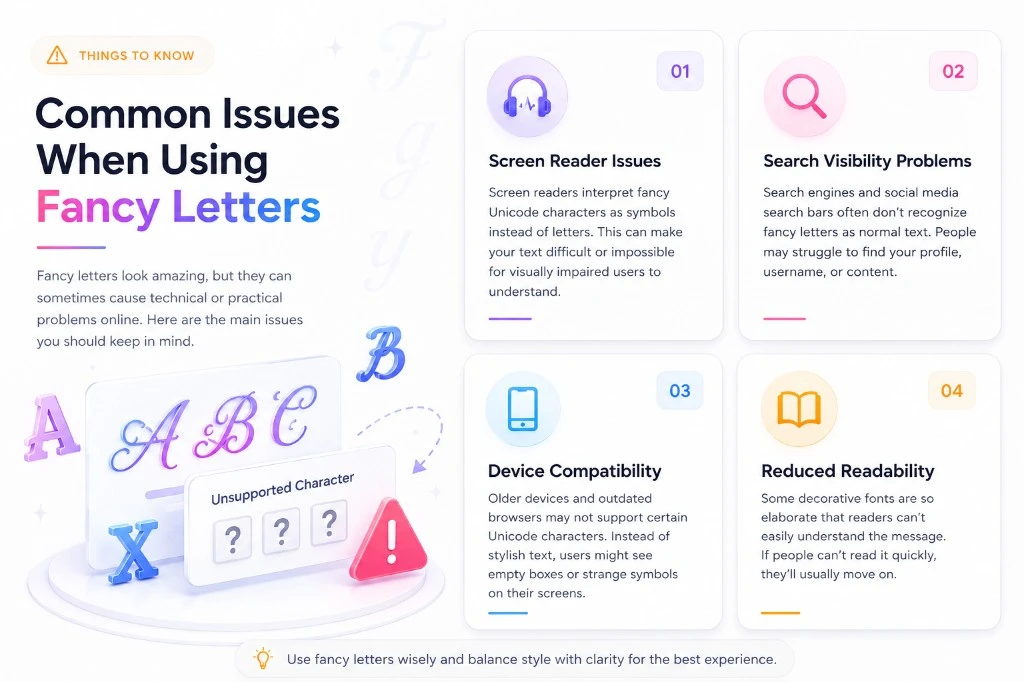
Common Issues When Using Fancy Letters
While these stylized characters look fantastic, using them can occasionally cause minor technical or practical issues online. You need to keep these challenges in mind so your text remains effective. Let’s review the main problems users face when using fancy letters.
Screen Reader Failures
Visually disabled individuals depend upon screen readers that read out text from the screen by interpreting standard codes for characters. In using your unusual characters, the screen reader will pronounce each character as a math symbol, thus rendering your text incomprehensible to them.
Search and Discovery Problems
Search engines and platform search bars do not recognize stylized symbols as standard alphabet letters. If you spell your username with fancy characters, people cannot find your profile when typing your regular name into a search bar.
Displaying Device Issues
The older version of phones and computers lacks up-to-date symbol fonts. As a result, your lovely cursive text is likely to appear on the screen in the form of boxes and question marks for those viewing your presentation.
Bad Text Readability
There are some fonts which are so messy that people find it extremely difficult to comprehend what you have written because of their heavy loops and shading. Your readers might completely ignore your content if they find your choice of font illegible.
Tips to Get the Best Fancy Text
Make your text look amazing and leave a lasting impression.
Keep It Simple
Simple fancy fonts are easy to read and have more impact. Don’t go overboard!
Match the Mood
Choose a font style that fits the tone and vibe of your message.
Use Decorations Wisely
Add stars, hearts or lines to make your text pop – but don’t clutter it.
Start With a Focus
Highlight the most important word or part of your text.
Don’t Overuse Styles
Using too many different fonts can make your text look messy.
Preview Before You Use
Always preview your text to make sure it looks perfect everywhere.
Extra Pro Tips
Use for Headlines
Fancy fonts are perfect for titles, bios, captions and highlighting key words.
Add Emojis
Emojis + fancy text = more expression and engagement!
Try Different Combos
Experiment with different styles and decorations to find your unique look.
Save Your Favorites
Bookmark your favorite styles to use again anytime with just one click.
Frequently Asked Questions
Bubble Letters are circular and inflated letters that contain thick outlines but an empty center. It is an old design that adds fun to any content and is most suitable for informal use, kid-oriented designs, or social media posts.
To draw them manually, start by sketching the basic outline of the letter very lightly with a pencil. Next, add weight to the downstrokes, incorporate decorative loops at the tips, and trace over the final shape with a fine ink pen.
Writing them requires you to slow down your hand movements and maintain consistents angle across all your words. You can practice using calligraphy sheets or brush pens to build muscle memory for elegant sweeps and curves.
Standard keyboards cannot type these styles directly, so you must use an online symbol generator tool. You type your text into the converter website, and it translates your keystrokes into the unique symbols automatically.
Beginners should start with simple italic slants or basic block shadows before attempting complex cursive flourishes. Utilizing graph paper helps you keep your letter heights and spacing perfectly uniform while you learn the shapes.
Yes, the vast majority of web-based generators are completely free and do not require account registration or software downloads. You can convert unlimited amounts of text instantly without hidden charges or subscription prompts.
Final Thoughts
Fancy letters copy and paste tools offer an incredibly simple, fast, and free way to break away from boring digital text standards. By converting regular text into unique web symbols, you can easily elevate your social profiles, gaming tags, and creative designs. However, you must balance this artistic freedom with legibility to ensure that your audience can still read your messages clearly. When used thoughtfully, these stylized fonts give your personal brand a distinct edge that captures attention across the web. Start experimenting with different generator styles today to transform your digital presence completely.